Sponsor Img GIS in the Field: Using LiDAR Makes Sense

Corner Down Image
Rated 4.3 out of 5 stars by viewers. 26 viewer ratings.

Green Savings!

Corner Down Image

Click on the graph below for a detailed Green Savings analysis of this event.


Webinar Details

Corner Down Image

When:

Feb 27, 2013 2:00 pm US/Eastern

Length: 01:24   (hh:mm)

Advance Registration NOT required.

View now on-demand.

Reviewed for Continued Content Relevance: 09/2016

Presenter(s):

  • Steve Nechero, Supervisory Cartographer, Branch Leader, USDA NRCS National Geospatial Management Center
  • Aaron Dushku, GIS Specialist, USDA NRCS - Massachusetts
  • Reed Sims, GIS Specialist, USDA NRCS - Vermont
  • Steve Crabtree, GIS Specialist, USDA NRCS - Kentucky

CEU Credits/Certificate Offered:

  • Certificate of Participation
  • Conservation Planner (CP) - 1 hour Conservation Planning Credit

Virtual Event Format:

Group Viewing Available:

You can view this webinar now on-demand.


This webinar is intended for non-GIS participants who use, or might use, GIS for conservation planning and design, and natural resources analysis and applications.

Participate in the webinar for a focus on one aspect of GIS, LiDAR data and its derivatives. The webinar will start with a basic introduction to LiDAR and continue with examples from three states. The examples illustrate (1) the improvements that LiDAR-derived data make in field operations, and (2) the three, of many, geographic products that come from LiDAR.

This webinar is sponsored by the USDA NRCS East National Technology Support Center.

Captions are provided for Internet Explorer users.
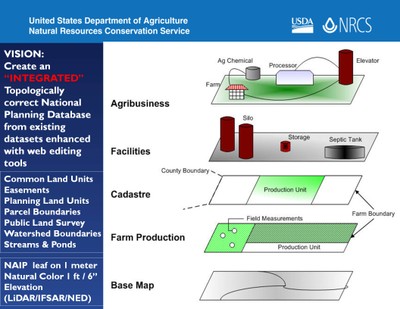
GIS in the Field image

Need Help!

Live captioning transcript is available upon request.

For information on connecting to the webinar or setting up YouTube - Embedded Video, please check out the FAQ section. If you continue to have issues connecting to the webinar or if you're having trouble with this website, contact us at contact@sref.info.

If this webinar is a standard portable media file format such as (.mp4, .avi, .mov, .flv) or a Microsoft Windows Media File (.wmv), you will need to have the Windows Media Player, Apple Quick Time Player, Real Player or other media player installed on your computer to view/play the webinar file. Depending on your internet browser, you may need to install a media player plug-in for your browser.

NOTE for Mac / ios users: if the webinar format is .wmv (a Windows Media File), you may need to install a 3rd party .wmv viewer on your computer such as Flip4Mac before you can playback this media file format.


SPONSORS:

  • Southern Regional Extension Forestry
    Southern Regional Extension Forestry
  • USDA NRCS
    USDA NRCS
  • NC State University Extension
    NC State University Extension
  • USDA Forest Service
    USDA Forest Service
  • The University of Georgia
    The University of Georgia

CONTACT:

COMMENTS & QUESTIONS

Full Name:

Email:

Message:


For the latest up-to-date live and on-demand agriculture webinars, videos, training, and events from the US Department of Agriculture, State Ag Divisions, University Cooperative Extension, and other notable agriculture organizations, visit the Agriculture Webinar Portal
For the latest up-to-date live and on-demand forestry and natural resource webinars, videos, training, and events from the USDA Forest Service, State Forest Divisions, University Cooperative and Forestry Extension, and from other notable forestry related organizations, visit the Forestry Webinar Portal
For the latest up-to-date live and on-demand conservation of natural resources webinars, videos, training, and events related from the USDA Natural Resource Conservation Service (NRCS), State Conservation and Natural Resource Divisions, University Natural Resource Extension, and other notable conservation and natural resource organizations, visit the Conservation Webinar Portal

Loading